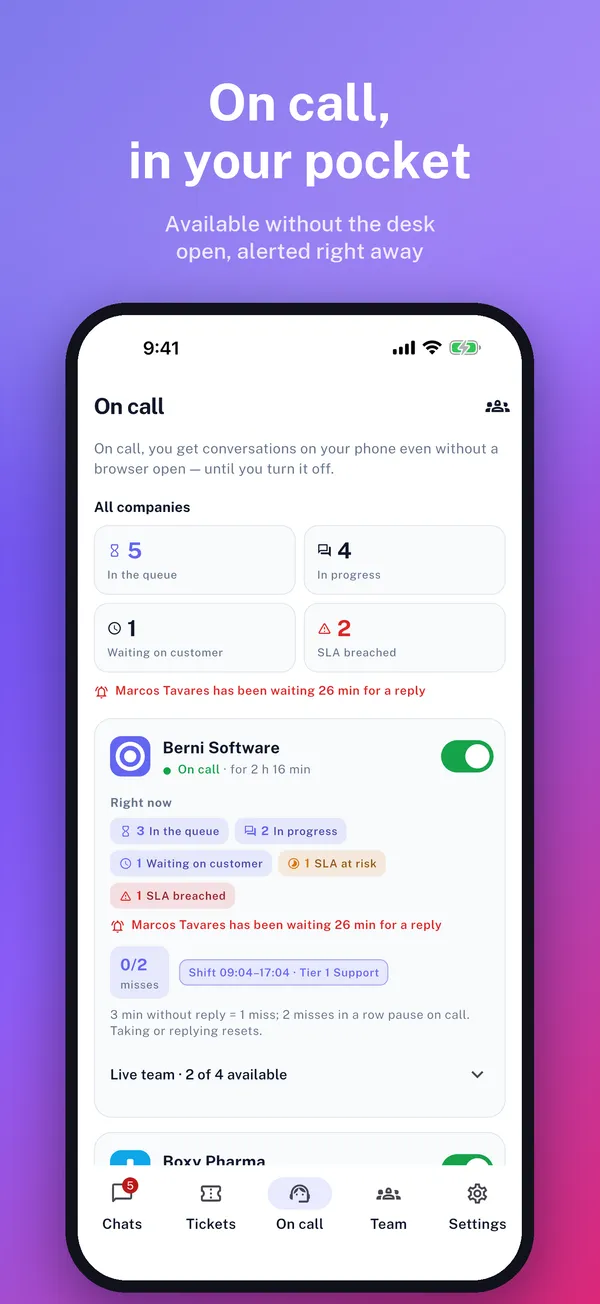
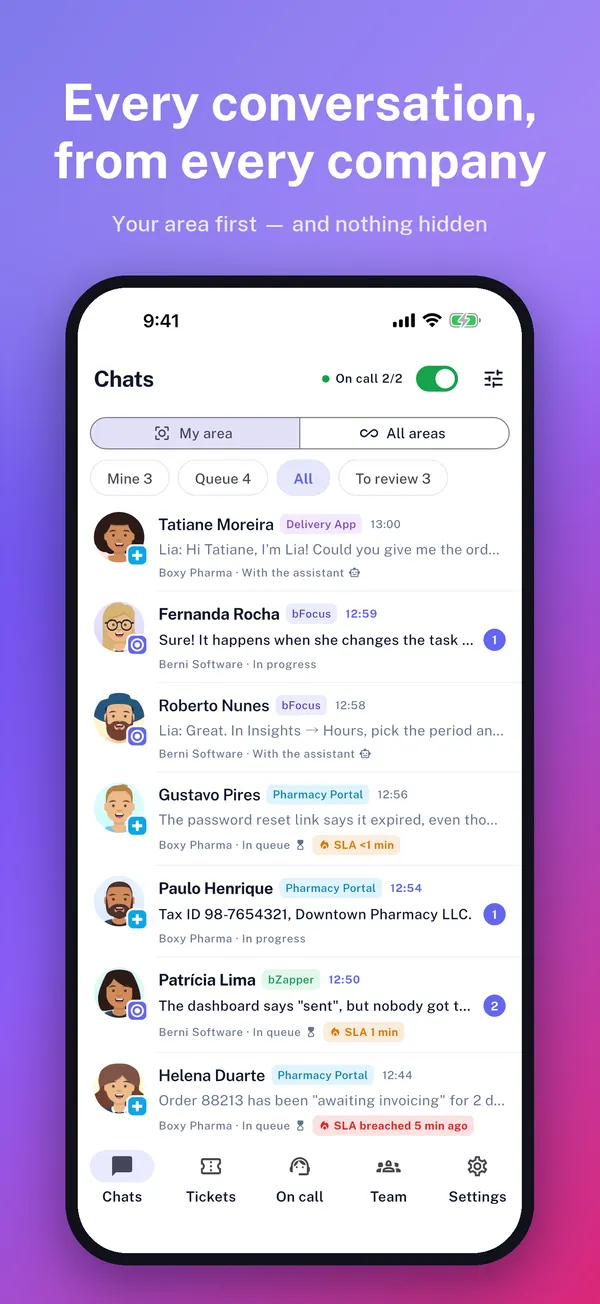
Your team answers from the phone: an app for iPhone, iPad and Android, with on-call and notifications you can reply to — and the same desk on Mac and Windows, on the way.
No credit card · account live in 5 minutes · unlimited users; live chat agents depend on the plan
9
native platforms
7
official SDKs
Your key
your AI, your model
bF
bFocus assistant
AI agent · answers with a source
Hi! I’m the bFocus assistant. I can show you the product, answer a pricing question or bring in someone from the team.
Do you have a widget for a Flutter app?
We do. The package runs on Android, iOS, macOS and Windows, with an unread badge and release notes inside the app. Source: Guide › Native apps › Flutter
I’d like a quote for 8 agents.
Done. I’ll hand this to the sales team with a summary of this conversation — you won’t have to repeat anything.
Transferred to Sales · summary sent
Here the AI runs on Berni Software’s key. In your bFocus, the key is yours.
Meanwhile, in the Mesa
Website visitor · Chat
AI handling it
No human deadline while the AI is handling it
AI summary
The AI is leading. If it transfers, the summary shows up here.
Take it Internal note Transfer
Padaria Estrela · Widget
AI handling it
Three modules
From the first hello to the latest release note, a module for each part
Teams, customers and products come with every contract. Users are unlimited on every plan (only the number of live chat agents varies by plan) — the price follows the volume of work, not the size of your team.
Sales
Your AI greets whoever arrives on the site, and the lead is born with your product’s script.
The assistant answers at your site’s door, on your company’s AI key
The lead is born with the product script and lands in triage
A first-reply clock, just like in support
Every email shows the state of the conversation, with the history numbered
You subscribe to the modules you want — one, two or all three — and the price follows the combination and the size. Users are unlimited on every plan, and tickets and leads share the same quota. Monitoring is not a fourth module: it is an add-on that stacks on top of any of them.
Single module or add-on · Monitoring
Catching the error is the easy part. The hard part comes after
An error tool pages you and stops there. Here the error does not become an alert: it becomes work — and it comes back as an answer to the customer who hit it. The path from "the system broke" to "we told the people it reached" stops being walked by hand, across three tools.
01Projects
It becomes a task by itself
A brand-new error files a draft bug task in the agent’s project, with where it blew up, the stack trace, the numbers and a priority suggested by severity and by how many customers were hit. The same error again does not open a second task: it only gets a comment at the milestones — 10, 100, 1,000 occurrences, every 5 new customers. Nobody reads a task that turns into spam.
02Support
The ticket arrives with the cause
A ticket opened by someone who hit an error in the last 30 minutes — or by anyone at the same customer in the last 2 hours — is born with an internal note tying ticket, error, task and probable cause together. The agent stops asking "what did the screen say?", because they already know.
03Release notes
And it comes back as an answer
Finishing the task resolves the error. An event from a newer version reopens the task on its own — "it is back in X". And once the fix ships in a version, the team decides to tell the people who were hit: an email in your company’s brand for each of them, and a note on every linked ticket. Nothing goes out unless someone sends it.
Where to install it
Browser
Node
Python
PHP
.NET
Java
Go
React Native
Flutter
What it costs
On its own, with no other module: the cheapest front door we have. On top of the plan you already have it costs even less — there the base of the contract is already paid for.
What Monitoring is not: an observability tool. There is no distributed tracing, no performance profiling, no response-time charting. The ground here is one thing only — errors that become work, and work that comes back as an answer to the customer.
New · bFocus Atendimento app
Your support desk, in your pocket
Your team’s app is already on the Apple and Microsoft stores — Android is next: reply, transfer and close conversations from every company you support, in a single list.
On-call from your phone, no computer open — with a clear 3-minute rule
Reply straight from the notification, without opening the app
Your area first, nothing hidden
On Mac and Windows it sits in the tray: close the window and on-call keeps working
Meet the app Now on the App Store, the Mac App Store and the Microsoft Store
The full cycle
From the lead to the release note, in one product
Our biggest advantage is not any single module: it is what happens when sales, support and projects live in the same database, on the same record of people and the same AI.
1
Someone lands on your site
Your assistant greets them, answers from your knowledge base and offers to bring in the team.
Sales
2
They become a lead, script included
Consented contact, product, source and what the script decided — with the first-reply clock already running.
Sales
3
The conversation switches sides, not systems
Support that turned into a sale? A sale that turned into support? One click switches sides in the same Mesa, and the conversation comes along.
Mesa
4
The customer asks for help
Through the widget on the site or inside the app, already identified by your server’s signature.
Widget
5
The AI tries first
It answers citing the article. With no source, it transfers with the summary and the details it gathered.
AI agent
6
Sometimes nobody has to ask
With the Monitoring add-on switched on, your system’s error arrives before the ticket does — grouped, with the customers it hit, and already a draft bug task in the right project.
Monitoring
7
It becomes a task in the sprint
The ticket lands in the right project, and a theme that keeps coming back becomes backlog.
Projects
8
The pull request links itself
The task key in the branch name or in the PR connects GitHub to the work.
GitHub
9
The deploy publishes the note
Your pipeline writes the release note through the API, per product and per version.
API
10
The badge lights up, and the read stays on record
The customer sees "New" inside the system they already use every day — and the report shows, customer by customer, who read it.
Release notes
In other tools, each of these steps lives in a different system — and your customer tells the story again in every one of them.
The AI is yours
bFocus does not supply AI. It uses the one you pick
Your key, your model, your depth and your cap in reais. We never charge per resolution and we do not mark up tokens.
Your key
8 providers
OpenAI, Anthropic, Google, DeepSeek, Mistral, xAI, DO Gradient or any compatible URL. The key belongs to your company, and it leaves whenever your company wants.
Your model
Chosen in your account
bFocus lists the models your key can reach and recommends one. Switching to a cheaper or a stronger one is a single click.
Your depth
None, assisted or autonomous
Per product. Assisted suggests replies to the agent; autonomous talks to the customer and transfers when it has no source. Turning it off is a legitimate option.
Your limit
Cap in reais
Per conversation, per user per day and per product per month, converted at the Central Bank PTAX rate and blocked before it overruns.
How the market charges
The model is theirs. You do not choose it, and it changes whenever they want.
Charged per resolution: Intercom R$ 5.35 and Octadesk around R$ 5.25.
A thousand conversations a month turn into a few thousand reais, with their margin baked in.
Turning the AI off does not lower the monthly fee.
How bFocus does it
Provider, model and depth are your call, product by product.
Zero per resolution to us: you pay the provider, at the provider’s price.
A thousand conversations cost around R$ 200 with a fast model.
With no key registered, bFocus works exactly the same — just without AI.
No exceptions: even semantic search in the knowledge base runs on your company’s key (OpenAI, Google, Mistral or DO Gradient). With a key that doesn’t build an index, such as Anthropic’s, search keeps working on words. Market prices checked in September 2026.
Two layers. In your customer’s app, the native widget. On your server, the SDKs that keep the records in sync: customer, people, who uses which product and each version’s release note go in under the id your system already uses — and repeating a call duplicates nothing.
In your customer’s app
Web · JavaScript10-line snippet Live
FlutterAndroid, iOS, macOS and Windows Live
iOSUIKit and SwiftUI Live
AndroidViews and Compose Live
React Nativeworks with Expo Live
.NETWinForms, WPF and MAUI Live
Delphi10.4+ and Delphi 7 as well Live
LazarusWindows, Linux and macOS Live
JavaJavaFX and Swing Live
PythonQt and Tk Live
On your server
Node · TypeScript@bfocus/sdk Live
Pythonpip install bfocus Live
PHPcomposer require bfocus/bfocus Live
.NET · Java · Go · RubyNuGet, Maven Central, go get and RubyGems Live
AppServer
<!-- before </body> -->
<script>
(function (w, d) {
w.bFocusQueue = w.bFocusQueue || [];
w.bFocus = w.bFocus || { init: function(o){ w.bFocusQueue.push(['init', o]); } };
var s = d.createElement('script');
s.async = true; s.src = 'https://widget.bfocus.com.br/v1/widget.js';
s.setAttribute('data-bf-key', 'bf_pk_…');
d.head.appendChild(s);
})(window, document);
bFocus.init({
user: { externalId: 'USR-123', name: 'João Silva' },
customer: { externalId: 'EMP-456', name: 'Empresa Ltda' },
userHash: '…'// signed on YOUR server
});
</script>
Brazil’s consumer-service deadline (Decree 11,034) goes into the queue maths: the ticket heats up before the deadline is missed, not after.
Shifts that know labour law
The on-call roster flags a workday over 10 h, less than 11 h between shifts and weekly rest under 35 h.
LGPD in practice
The admin exports the data of anyone who uses the widget, and every export is recorded with who did it and when.
AI cost in reais
Caps are set in R$, converted at the Central Bank PTAX rate. No in-house credits, no account in dollars.
Portuguese, English and Spanish
App, widget, emails and this site in all three languages, written to the same standard.
Email under your brand
Your company name as the sender and your own footer. The customer replies to the email and the reply lands on the right ticket.
Projects
What support uncovers becomes delivery
Sprints, Kanban with your own columns and recurring tasks — always with the ticket it came from one click away.
Kanban columns defined by your company, not by the tool
A sprint per department, with burndown and whatever is left carried over
Recurring tasks that create themselves, with pause and close
Public task link to show progress to people who do not use the system
Sprint 24 · Product
8 tasks · 3 days left
VBLMAC
To do3
BFO-142
Resend the invoice through the portal
Ticket
VB
BFO-145
Export report as XLSX
Recurring theme
LM
In progress2
BFO-138
Filter the queue by product
PR #214
VBAC
In review2
BFO-131
Release note badge in the customer’s app
Ready for the note
AC
Security
Each customer sees only what is theirs
Identity signed by your server, roles and departments in the app, and a record of what was done and by whom.
Verified identity
Your server signs who the user is and which company they belong to, and the signature lasts 7 days. With verified identity turned on, an unsigned session does not get in — and a widget created today starts with it already on.
Scoped keys
Publishable key in the browser, server key with scopes, IP allowlist and revocation at any time.
Record and acknowledgment
Approvals confirmed by code, release-note acknowledgment per customer and a history of what changed.
Pick the modules and the size: those two answers set the price. Users are unlimited on every plan, and there is a single quota — a ticket and a lead count the same. WhatsApp is contracted separately, with our partner bZapper, and the AI runs on your company’s key: neither is part of the monthly fee.
Monitoring adds on top of a plan with Projects, at your plan’s size: errors from your system arrive as work items on the board.
You do, straight to the provider. bFocus does not supply AI: your company brings its own key (OpenAI, Anthropic, Google, DeepSeek, Mistral, xAI and others), picks the model and sets spending caps in reais per conversation, per user and per product. We never charge per resolution and never mark up tokens.
Do I pay per user?
No. Users are unlimited on every plan; what varies by plan is the number of live chat agents. The price follows the volume of work, not the size of your team.
Is there a trial?
Yes: 14 days with all three modules and no credit card. Live chat and WhatsApp are enabled by our team. When the trial ends you subscribe to a plan or move to the free one, as long as your account usage fits its limits. If you do neither, the account keeps working for 3 more days and is then suspended.
What counts towards the monthly quota?
A ticket and a lead count the same, against one quota — that is why the plan says “tickets/leads per month”. It covers tickets opened on any channel (widget, chat, email, WhatsApp or phone) and leads born on your site or entered by your team. Replies and comments do not count, and a chat conversation becomes a single ticket. WhatsApp conversations count here, but the number’s plan is contracted separately, at bZapper.
What happens if I go over the limit?
Nothing coming from your customer is blocked: tickets through the widget, chat, email or WhatsApp always come in, and so do leads from your site. What stops above the quota is your team opening tickets manually inside the app, until you move up a plan or the month turns over. The month’s usage is shown in the subscription area.
Where is the data hosted?
On DigitalOcean infrastructure, with a managed database and backups. Processing follows the Brazilian data protection law (LGPD), and the security page details what is collected, for how long, and how to export or delete it.
Start supporting better today
Live account in 5 minutes. No credit card. Cancel whenever you want.
We use audience measurement (Google Analytics) and the Meta Pixel to learn which pages help and to show bFocus to people looking for something similar on Facebook and Instagram. The site works the same without them. How we handle your data